Hearts and Polka Dots Seamless Patterns: A Practical Guide to Getting the Most from Your Digital Bundle
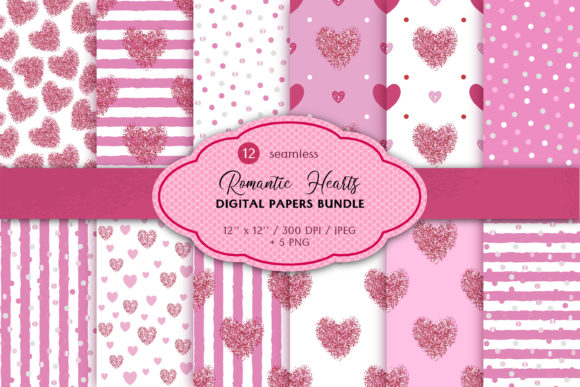
If you design invitations, create scrapbook pages, or produce sublimation merchandise, you know how much the right background pattern can elevate a project. The Hearts and Polka Dots Seamless Patterns bundle offers twelve pink Valentine’s Day seamless digital papers with glitter accents, but buying a digital product is different from picking up a physical roll of wrapping paper. Without a clear understanding of file formats, resolution requirements, and what “seamless” actually means, you can end up with unusable files, wasted time, and a project that falls short of your vision.
This guide walks through common mistakes people make when choosing, downloading, and applying these patterns—and how to avoid them so you get the smooth, professional results you expect.
What You Are Actually Buying
The bundle includes twelve JPEG digital papers and five PNG files with transparent backgrounds, all sized at 12 x 12 inches with a resolution of 3600 x 3600 pixels at 300 dpi. Every pattern is seamless, meaning the edges repeat without visible seams, making them suitable for large surfaces like website backgrounds, banner wraps, or repeated print layouts.
The Hearts and Polka Dots Seamless Patterns are delivered as a single ZIP file that you must extract using software such as WinZIP or WinRAR. No physical product will be mailed, and the preview scenes shown in the product listing are not included in the download.
Mistake #1: Confusing “Seamless” with “Tile-Ready” Without Checking the Actual Repeat
Many creators assume that any pattern labeled “seamless” will automatically repeat perfectly in any software. The truth is that not all seamless patterns are created equal. Some digital papers have subtle directional repeats that work beautifully on a square but break down when you tile them across a long banner or a curved surface.
Before you commit to a project, open one of the JPEG files in your design software and test the repeat at 100% zoom. Create a small grid of four tiles and look for hard edge lines, mismatched motifs, or color shifts at the seams. The Hearts and Polka Dots Seamless Patterns are designed to avoid these problems, but it is still wise to confirm that the repeat direction matches your layout orientation. If you plan to print on fabric or pour resin, a misaligned repeat becomes painfully obvious at scale.
Better approach: Always run a quick tile test before you build an entire design around a pattern. This five-minute check saves hours of rework later.
Mistake #2: Overlooking the Differences Between JPEG and PNG Files
The bundle gives you twelve JPEG files and five PNG files with transparent backgrounds. Both formats serve distinct purposes, and using the wrong one for your task can ruin a clean design.
JPEG files are excellent for full-coverage backgrounds, scrapbook pages, and printed invitations where you want the pattern to fill the entire area without transparency. However, JPEG does not support transparent backgrounds well—so if you place a JPEG over another image, you will see a white box around the pattern.
The five PNG files with transparent backgrounds are ideal for layering. You can place a heart-and-polka-dot motif over a solid color card base, a photo, or another pattern without harsh borders. Beginners sometimes overlook these PNG files entirely and try to force JPEGs into layered compositions, which limits design flexibility.
Practical tip: Use the JPEG files for standalone backgrounds and printed papers. Reach for the PNG files when you need overlay effects, greeting card fronts, or digital collages where the pattern should sit on top of another element.
Mistake #3: Ignoring Resolution and Size Requirements for Your Specific Medium
All files are 3600 x 3600 pixels at 300 dpi. That resolution is excellent for standard printing, sublimation transfers, and digital use. But it is not automatically right for every application.
If you create large-format signage, for example, a 12 x 12 inch tile at 300 dpi will need to be scaled up significantly. When you enlarge a raster image beyond its native size, you risk pixelation and blurry edges. Conversely, if you use these files only for web graphics, 300 dpi is overkill—it slows down loading times without any visible improvement on screens.
Common oversight: Sublimation printers often require mirrored images at specific inch dimensions. Cutting and scaling a 12 x 12 inch pattern to fit a smaller product like a mug or coaster is fine, but printing it at 20 x 20 inches on a T-shirt press will degrade quality.
Better approach: Check the recommended output size for your printer or platform before you scale the pattern. For web use, reduce the resolution to 72 or 150 dpi to keep file sizes manageable. For print, stay at 300 dpi and keep the pattern within a 12 x 12 inch area or smaller if possible.
Mistake #4: Misunderstanding the ZIP File and Extraction Process
Your download arrives as a single compressed ZIP file. This is standard for digital papers, but it trips up new buyers. Some try to open the ZIP file directly on a phone or tablet without an extraction app and find they can see only folder names, not the actual patterns. Others attempt to upload the ZIP file directly to print-on-demand platforms, which typically do not accept compressed archives.
You must extract the files using WinZIP, WinRAR, or your operating system’s built-in extraction tool before you can use the JPEG and PNG files in design software. If you skip this step, you will see an error or an empty file listing.
Practical advice: Download the ZIP file to a dedicated folder on your computer. Extract everything into a subfolder labeled with the product name. Then remove the original ZIP to keep your workspace clean. This habit also helps you locate the transparent PNG files later without digging through compressed archives.
Also, remember that preview scenes shown in the product listing are not included in the ZIP file. Only the 17 pattern files (12 JPEG + 5 PNG) are there.
Mistake #5: Forgetting to Verify Software and Machine Compatibility
This point appears directly in the product notice, but many buyers skip it. Before you complete your purchase, confirm that your design software and any connected machines support JPEG and PNG formats at 300 dpi. Most major programs—Photoshop, Illustrator, Affinity, Canva Pro, Procreate, Cricut Design Space, and Silhouette Studio—handle these files without issue.
However, some older versions of software may struggle with 3600 x 3600 pixel PNG files because of memory limitations. Similarly, if you use a cutting machine that expects SVG or DXF files for print-then-cut operations, you will need to import the pattern as a background image rather than a cut file.
What to check: Look at your machine’s file format list before you buy. If you plan to use these patterns for sublimation, confirm that your printer driver accepts high-resolution JPEG files without downscaling them automatically. A quick test print with one of the JPEG files after purchase will tell you immediately whether the pattern holds its detail.
Mistake #6: Using the Pattern in Isolation Without Considering Scale and Composition
Even a beautiful seamless pattern can feel flat if it fills an entire page without any variation in scale or placement. Beginners sometimes drop a full-tile pattern onto a greeting card or a scrapbook page and call it done, missing the chance to create depth and emphasis.
The Hearts and Polka Dots Seamless Patterns include glitter accents, which work well as a subtle backdrop. If you use the largest tile size straight out of the box, the glitter hearts may dominate the composition and distract from your main focal element.
Better approach: Experiment with scale. Reduce the pattern to 50% or 75% for a fine, delicate texture. Use the transparent PNG files to overlay a few larger hearts at different rotations over the background repeat. This layered technique gives you a cohesive custom look without relying on a single flat tile.
For sublimation projects, try using the pattern as a background fill behind text or a central graphic rather than printing it over the entire surface. Leaving some negative space around the design creates visual breathing room and keeps the glitter texture from becoming overwhelming.
What to Do Before You Buy
Digital products require a slightly different mindset than physical purchases. You cannot hold the paper in your hands, but you can verify a few things upfront to avoid disappointment.
- Read the file list carefully. The bundle includes 12 JPEG and 5 PNG files. If you need more than five transparent backgrounds, consider whether you can work around that limitation or whether you need a larger set.
- Understand the license terms. Most seamless pattern bundles allow commercial use but sometimes restrict redistribution of the raw files. If you plan to sell printed products using these patterns, check the seller’s licensing language.
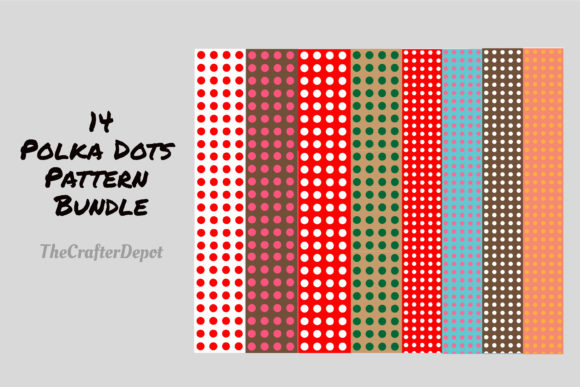
- Look at the pattern variety. Twelve designs give you a healthy range of pink tones, heart sizes, and dot distributions. If your project requires very specific pink shades (light blush versus hot pink), examine the listing images closely to confirm the palette matches your needs.
Practical Ways to Use These Patterns Effectively
Once you have the files extracted and your software compatibility confirmed, you can apply the patterns in several ways that go beyond basic backgrounds.
- Scrapbooking and card making: Print the JPEG files on matte or glossy photo paper and cut them to size. Use the PNG files to layer hearts over solid cardstock for a dimensional effect.
- Sublimation printing: Import the pattern into your design software, mirror the image if needed, and size it to fit your blank. The seamless repeat works well on tumblers, coasters, and mouse pads.
- Digital backgrounds: Use the patterns in Zoom backdrops, blog headers, or social media templates. Reduce resolution to 150 dpi for faster loading.
- Invitations and announcements: Combine one of the polka-dot patterns with a simple font for Valentine’s Day, baby shower, or bridal shower invites. The pink palette works for romantic and playful themes alike.
A Final Word on Expectations
You are purchasing a digital file, not a subscription or a physical shipment. That means instant delivery, full ownership after download, and the freedom to use the patterns across multiple projects. The trade-off is that you must handle file extraction, format selection, and scaling decisions yourself.
If you take a few minutes to understand the Hearts and Polka Dots Seamless Patterns bundle—its strengths, its format limitations, and how seamless repeats actually behave in different media—you will avoid the frustration of mismatched prints, missing transparency, or blurry enlargements. Check your software, test a tile, reach for the PNG files when you need layering, and scale thoughtfully. With those habits in place, these patterns become a reliable tool that saves you time and gives your work a polished, consistent look.