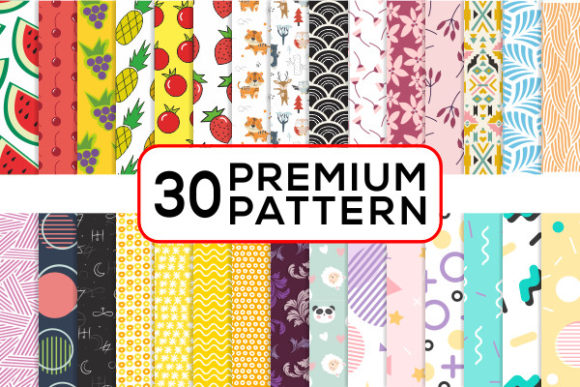
Premium Seamless Patterns Set: Integrating Repeatable Design Assets into Your Creative Workflow
A well-structured design process relies on assets that deliver consistency without limiting creativity. The Premium Seamless Patterns Set offers a collection of repeatable textures and motifs that can be integrated at multiple stages of a project, from initial concept development through final production. Whether you are preparing artwork for print, building a digital product line, or creating branded collateral, these patterns provide a reliable foundation for scaling your output efficiently.
What the Premium Seamless Patterns Set Brings to Your Process
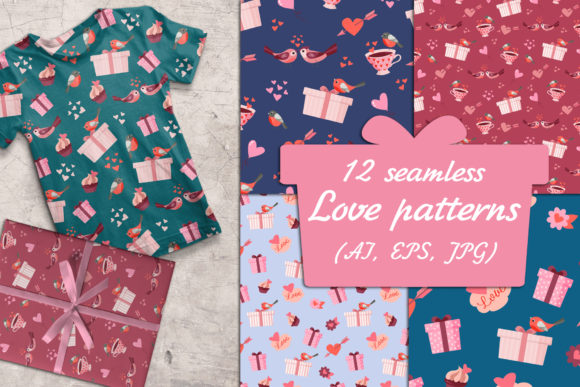
At its core, this set contains seamless patterns that tile without visible edges, making them suitable for continuous surface designs. The package includes Adobe Illustrator CS files, EPS format, high-resolution PNG files, and JPG files at 300 dpi with dimensions of 2000 pixels. This range of formats means you can work across vector and raster environments without converting or resampling during critical workflow stages.
Using a dedicated pattern set changes how you approach repetition and texture. Instead of manually constructing repeat units or relying on basic tile tools, you can drop a finished pattern into your project and focus on composition, color adjustment, and layout. This shift saves time and reduces the risk of alignment errors, especially when working on multiple deliverables under deadline pressure.
Where Patterns Fit in a Creative Workflow
Understanding where to introduce a pattern asset depends on the type of project and your preferred sequence of decisions. The Premium Seamless Patterns Set can be used before, during, or after the main design phase, and each placement changes how the asset contributes to the final result.
Before the Project: Preparation and Asset Selection
During the planning stage, you can browse the pattern library to identify motifs that align with your project's visual direction. Reviewing patterns early helps you determine color harmony, scale, and the overall texture you want to achieve. If you are designing a line of products such as T-shirts, cell phone covers, or invitations, selecting patterns in advance allows you to build a consistent palette across the entire collection.
This preparation also streamlines client approvals. Presenting pattern options alongside initial mockups gives clients a clearer picture of the final look, reducing the need for major revisions later. The high-resolution JPG and PNG files are particularly useful for early presentations because they render well on screen and in print proofs without requiring the client to open vector software.
During the Project: Application and Iteration
Once you move into active design work, seamless patterns become a layer you can apply, scale, rotate, or mask without disrupting the underlying layout. In Adobe Illustrator, the included EPS and AI files allow you to edit pattern components directly. You can adjust colors, resize motifs, or combine multiple patterns from the set to create hybrid textures that feel unique to your project.
For digital projects such as website backgrounds or digital album covers, the PNG format with transparency support enables clean overlay effects. You can place a pattern behind text or imagery without worrying about a solid background box. The 2000-pixel resolution is large enough for most screen applications, and the 300 dpi specification means the same file can transition to print without loss of quality.
After the Project: Archiving and Repurposing
Seamless patterns are reusable by nature. Once you have integrated a pattern into one project, you can archive it with notes about color adjustments or scaling preferences. When a similar project arises months later, you can retrieve the pattern and adapt it rather than starting from scratch. The zip file structure makes it easy to store the entire set in a dedicated folder alongside your project files, keeping your asset library organized and accessible.
This repurposing capability is especially valuable for entrepreneurs and small business owners who manage multiple product lines. A pattern used on a jewelry display card can later be adapted for a magnet set or nail wrap design, maintaining brand consistency across different merchandise categories.
Practical Use Cases Across Product Types
The variety of applications listed for this set reflects the flexibility of seamless patterns in real-world production. Each use case involves slightly different technical requirements, and understanding those differences helps you select the right file format and preparation steps.
Print Products: Invitations, Cards, Bottle Caps, and T-Shirts
For print items, the 300 dpi JPG and EPS files are your primary choices. When designing invitations or cards, you can use a pattern as a background element or as a border motif. Because the pattern repeats seamlessly, you can extend it across the entire surface without visible breaks—important for folded cards or multi-page suites.
For bottle caps and magnets, which have small print areas, a pattern with 2000-pixel resolution gives you more than enough detail to maintain crisp edges. You can scale the pattern down without losing sharpness, and the vector EPS files allow for precise scaling if the printer requires a specific size. T-shirt designs often incorporate patterns as fills for text or shapes, and the seamless quality ensures the design wraps consistently around contours.
Digital Products: Website Design, Cell Phone Covers, and Digital Albums
When designing for screens, file size and format matter. The PNG files in this set support transparency, which is essential for overlaying patterns on website backgrounds or app interfaces. You can tile the pattern using CSS or place it as a single large image that repeats naturally. Cell phone cover mockups benefit from the high resolution because the pattern remains sharp on retina displays.
Digital albums and photo books often use patterns as subtle page backgrounds or as framing elements. Because the patterns are seamless, you can apply them across multiple pages without worrying about alignment at the gutter or edge. This consistency gives the album a cohesive visual identity without requiring you to design each page individually.
Small-Scale Crafts: Jewelry, Nail Wraps, and Paper Crafts
For craft applications, the pattern set provides a professional finish without the need for specialized design skills. Nail wraps, for example, require patterns that repeat beautifully at a very small scale. The 2000-pixel files give you the detail needed for tiny repeat units, and the seamless tiling ensures the pattern flows naturally from one nail to the next. Jewelry designers can use patterns on product cards, tags, or packaging inserts, creating a unified brand experience for each piece.
Paper crafters often work with physical cutting and folding, so having a pattern that repeats cleanly across a sheet reduces waste. You can print a full page of pattern and cut elements without worrying about mismatched edges.
File Formats and Cross-Platform Compatibility
One of the practical advantages of this set is the inclusion of multiple file formats, each suited to different stages of a workflow. Understanding when to use each format prevents unnecessary conversion steps and preserves quality.
- Adobe Illustrator CS and EPS files: These vector formats are ideal for projects that require scaling, color editing, or integration with other vector elements. Use these when you need to modify the pattern's composition or combine it with custom typography and shapes.
- PNG files: Best for digital applications where transparency is needed. These files work well in web design, presentation software, and photo editing tools that support layers. The high resolution ensures they remain sharp on modern screens.
- JPG files (300 dpi, 2000 px): Suitable for print-ready applications where file size matters and a solid background is acceptable. These are directly usable in most print layout software and online print services.
Having all formats in a single zip file means you can prepare your project in a vector environment, export previews in PNG for client review, and produce final print files in JPG or EPS without re-exporting from the original source. This reduces the number of intermediate files and minimizes the chance of version conflicts.
Organizing Your Pattern Library for Efficiency
To get the most out of a pattern set, organization matters. When you first download the zip file, consider creating a structured folder system that mirrors how you work. One approach is to sort patterns by visual style, color family, or intended application. If the set includes multiple motifs, you might group them by complexity or scale.
Naming files consistently also helps. If the original filenames are generic, renaming them with descriptive tags such as "geometric-blue-large" or "floral-white-repeat" allows you to locate assets quickly during a project. Many designers maintain a master library folder that contains all purchased pattern sets, with subfolders for each set and a spreadsheet tracking file format, resolution, and usage notes.
If you collaborate with a team, storing the pattern files on a shared server or cloud drive with synchronized naming conventions ensures everyone accesses the same version. This is particularly important when patterns are used across multiple projects simultaneously, such as a product line that includes invitations, T-shirts, and magnets all using the same motif.
Maintaining Consistency Across Projects
Consistency in design does not mean repeating the same pattern everywhere. It means using the same quality standards and visual language across different output types. The Premium Seamless Patterns Set supports consistency by providing uniform resolution and repeat quality across all files. When you use the same pattern for a website background and a printed card, the visual relationship between the two remains strong because the pattern's structure and scale are identical.
If you need to differentiate projects while keeping a core motif, you can use the vector files to create color variations. A pattern that appears in blue on a cell phone cover can shift to gray for a business card or to warm tones for an invitation suite. This flexibility allows you to maintain brand recognition without becoming repetitive.
Long-Term Value and Scalability
Design assets are most valuable when they remain usable as your projects grow in complexity. Because the patterns in this set are provided at 300 dpi and 2000 pixels, they can be scaled up or down within reasonable limits without degrading. For large-format prints such as posters or banners, you can use the vector EPS files to retain sharpness at any size. For small items like bottle caps or magnets, the high resolution ensures crisp detail even after resizing downward.
Over time, you can build a library of variations by combining patterns from different sets or by layering two patterns from the same collection. Because the files are structured as standard formats, they remain compatible with future software updates. You are not locked into a proprietary system, which protects your investment in the asset library.
For entrepreneurs and freelancers who produce multiple product runs each quarter, having a set of reusable patterns means you can launch new items faster. You can develop a template that uses a pattern as a fill, then swap in different motifs from the set for each new release. This approach reduces design time while maintaining a polished, professional appearance.
Integrating Patterns into a Larger Toolset
No pattern set operates in isolation. The Premium Seamless Patterns Set works alongside your existing design software, printing services, and production partners. If you use Adobe Creative Cloud, the AI and EPS files import directly into Illustrator, InDesign, and Photoshop. The PNG and JPG files are compatible with a wide range of tools, including Canva, Affinity Designer, Procreate, and web development platforms.
When preparing files for print vendors, verify their preferred format and resolution. Many commercial printers accept 300 dpi JPG files at full size, while others require layered EPS or PDF files. Having both vector and raster options in one set means you can comply with vendor specifications without reworking your design. Similarly, for digital marketplaces that require specific dimensions, the 2000-pixel base provides a strong starting point for cropping or tiling.
Quality Control Checks Before Final Output
Even with a professionally made pattern set, a few quality checks ensure the seamless tiling holds up in your final piece. Before committing to a large print run or publishing a digital product, test the pattern at actual size. View the repeat on a large canvas to confirm there are no visible seams, color shifts, or compression artifacts. The 300 dpi files should render smoothly at full resolution, but scaling up beyond 2000 pixels may require vector output or a larger source file.
If you are combining multiple patterns from the set in a single design, check that the scale and orientation complement each other. Mismatched scales can create visual tension, but if that is the desired effect, intentional contrast can work well. The key is to make deliberate choices rather than leaving alignment to chance.
For print projects, request a physical proof before full production. Colors can vary between screen and print, and a proof lets you verify that the pattern's detail is preserved at the actual print size. For digital projects, view the design on multiple devices to ensure the pattern renders consistently across browsers and screen types.
Conclusion
The Premium Seamless Patterns Set is more than a collection of decorative tiles. It is a practical resource that fits into a wide range of creative and commercial workflows, from initial asset selection to final production. By understanding how to integrate these patterns at different project stages, you can reduce repetitive work, maintain consistency across product lines, and scale your output efficiently. The included file formats support both vector and raster workflows, making the set adaptable to print, digital, and craft applications. Whether you are designing for clients, building your own product line, or managing a team, this pattern set provides a reliable foundation for repeatable, high-quality design work.