Juicy Lemon Elements and Patterns: Versatile Design Assets for Creative Workflows
Design projects often stall not because of a lack of skill, but because of a shortage of the right raw materials. You can spend hours hunting for vector elements, testing background fills, or trying to create a cohesive look from mismatched resources. That friction interrupts your flow and eats into the time you should spend refining the final output. Juicy Lemon Elements and Patterns solves that bottleneck by delivering a focused, ready-to-use asset pack built around a single vibrant theme, with flexibility baked into every file.
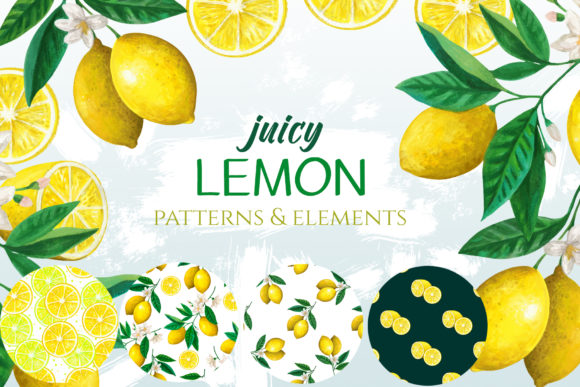
This set includes four PNG elements with transparent backgrounds—two fruit slices and two branches—along with four seamless pattern PNGs that let you layer any color beneath them. On top of that, you get six JPEG files of the same patterns in several background color variations, giving you immediate options for mockups, presentations, or digital products. The combination of transparent PNGs and pre-colored JPEGs means you can either drop assets directly into a layout or customize them further without losing quality. Understanding how to weave these pieces into your existing workflow makes the difference between owning a resource and actually using it effectively.
What Juicy Lemon Elements and Patterns Delivers Out of the Box
Before you integrate any asset pack into your process, you need to know exactly what you are working with. The four PNG elements—two lemon slices and two branch motifs—are isolated on transparent backgrounds. That means no clipping masks, no complex extraction, and no leftover white boxes around your subject. You can drag them straight into a design file, move them around, scale them, and layer them over photography, solid colors, gradients, or even other patterns without additional cleanup.
The four seamless pattern PNGs also come with transparent backgrounds. Seamless patterns tile infinitely without visible seams, which is critical for backgrounds, wrapping paper, fabric mockups, or digital scrapbooking pages. Because the patterns themselves have no background fill, you can place them over any colored surface and the pattern will appear on top while the underlying color shows through the empty areas. This one design decision dramatically multiplies the number of looks you can achieve from a single pattern file.
The six JPEG pattern files offer a faster path to finished work. Each pattern appears on a different background color, so you can browse and pick a combination that already works with your palette. JPEGs are universally compatible, load quickly in previews, and require no special software handling. If you need a quick social media graphic, a product mockup, or a presentation slide background, you can use these files without opening a separate editing program.
Where These Assets Fit in a Broader Creative Process
Every project follows some kind of arc, whether you are building a brand kit, designing a set of printables, or preparing content for a seasonal campaign. Juicy Lemon Elements and Patterns can serve different roles depending on where you are in that arc.
Before the project begins: When you are mood boarding or concepting, the visual language of lemon slices, branches, and citrus-inspired patterns can anchor a summer theme, a wellness brand, or a food-related product line. Instead of collecting random inspiration images, you can load the PNG elements into a mood board and start arranging them alongside fonts and color swatches. The transparent backgrounds let you test compositions without committing to a final layout.
During the design phase: This is where the assets do their heaviest lifting. The four PNG elements become building blocks for hero images, badges, icons, or decorative accents. The seamless patterns can fill banner backgrounds, wrap around product packaging mockups, or serve as subtle texture behind text. Because the patterns tile infinitely, you do not need to worry about edge alignment when stretching them across large areas.
After the main design is complete: You might use the pre-colored JPEG patterns to produce multiple variations of a final design quickly. If a client wants to see the same marketing flyer in three color schemes, the JPEG files give you instant alternatives without re-building the background from scratch. The transparent PNGs also allow last-minute adjustments—tweaking the position of a lemon slice or swapping out a branch element without affecting the rest of the layout.
Practical Integration with Your Existing Tools and Platforms
Juicy Lemon Elements and Patterns works with any software that accepts PNG or JPEG files. That covers nearly every design tool a professional or entrepreneur might use: Adobe Photoshop, Illustrator, InDesign, Affinity products, Canva, Procreate, Figma, Sketch, GIMP, and many others. The files are standard-resolution raster graphics, so they fit naturally into print and digital workflows where pixel-based assets are appropriate.
For seamless pattern PNGs, the key technical requirement is that your software supports layering. In Photoshop or Affinity, you place the pattern PNG on a layer above a colored background layer, and the pattern appears on top while the background color fills the transparent gaps. In Canva, you upload the pattern PNG, add a colored shape or page background behind it, and the same effect occurs. This layering approach is simple, non-destructive, and gives you infinite color control without altering the original file.
The JPEG pattern files require no layering at all. You can set them directly as a page background in a document, insert them into a slide deck, or use them as a base for a digital product cover. JPEG compression is minimal enough at typical sizes that the patterns remain crisp for screen use, though for large-format print you would want to check resolution against your output size.
Real-World Workflow Examples
An entrepreneur launching a lemonade stand or citrus-themed product line can use the elements as logo accents or social media icons. The branch PNGs work well as corner decorations on a menu, while the lemon slices can appear as repeating motifs on a website header. The seamless patterns become wrapping paper, napkin mockups, or even a pattern for reusable shopping bags if you are creating product presentations for a manufacturer.
A blogger or content creator preparing a summer recipe roundup can place a lemon slice PNG next to each recipe title, layer a seamless pattern over a pastel background for the post thumbnail, and use the pre-colored JPEGs for Pinterest pins. Because the elements are transparent, they can overlap text without blocking readability if positioned carefully.
An educator designing learning materials about fruit, plants, or nutrition can use the branch elements as visual anchors for flashcards, diagrams, or printable worksheets. The seamless patterns work as page borders or fill areas for younger students to color. The consistent lemon theme ties the whole set together, which is especially useful when you need a unified look across multiple pages or modules.
A freelancer producing client work for a juice brand, a farmers market, or a spa can leverage the pre-made color variations to speed up revisions. Instead of recreating a pattern background in a new color every time a client requests a change, you can swap in one of the JPEG files and move on. If the client wants a color not included in the set, you use the transparent PNG pattern and place a custom background behind it.
Organizing and Managing the Asset Library for Efficiency
Long-term usability depends on how you store and name these files. If you drop them into a general downloads folder, you will lose time hunting for the right element later. Create a dedicated folder for Juicy Lemon Elements and Patterns, and within it, subfolders for the transparent PNG elements, the transparent PNG patterns, and the JPEG pattern variations. Consider renaming files with descriptive prefixes: lemon_slice_01.png, branch_right_02.png, pattern_hex_white_bg.jpg. This practice becomes invaluable when you have multiple asset packs and need to locate a specific file quickly.
If you use a digital asset management tool or a cloud storage service like Dropbox, Google Drive, or Notion, tag the files with relevant keywords: lemon, citrus, branch, pattern, seamless, summer, food, wellness. That way you can search across all your design resources and pull up these assets without remembering exact folder locations.
Consistency across projects also depends on how you reuse the elements. If you create a brand guideline or a simple style sheet that notes the color codes you typically pair with these patterns, you can replicate the same look every time. The transparent PNGs make it easy to apply the same elements across different background colors while keeping the visual identity intact.
Quality Control and Long-Term Use Considerations
Because the elements and patterns are PNG files, resolution is fixed. For digital projects, standard screen resolution (72 PPI) works fine, and the files should scale down without issue. Scaling up beyond their original dimensions may introduce pixelation, so test the size before committing to a large print layout. If you need to enlarge an element significantly, consider converting it to a vector trace in a program like Illustrator, though the results depend on the complexity of the image.
The JPEG pattern files use lossy compression, which is standard for photographs and complex graphics. For print-on-demand products or high-resolution output, verify that the JPEG quality level meets your printer's requirements. If not, you always have the transparent PNG pattern as a fallback, which you can place over a custom background and export as a high-quality TIFF or PDF.
Long-term value comes from the versatility of the transparent assets. Trends change, color palettes shift, and your own style evolves. The same lemon slice and branch elements can look modern in one year and retro the next, depending on the colors, textures, and layout choices you pair them with. The transparent background guarantees that the assets themselves do not become obsolete. You can keep using them as long as you remain active in design, content creation, or product development.
Bringing It All Together
Juicy Lemon Elements and Patterns is not a one-hit resource that you use once and forget. It is a modular set that fits into multiple phases of a project, adapts to different color schemes, and works across the tools and platforms you already rely on. The combination of transparent PNG elements, transparent seamless patterns, and pre-colored JPEG variations gives you both flexibility and speed. You can use the assets for quick turnaround tasks like social media graphics, or you can incorporate them into larger, more polished projects like branding suites, printable product lines, or educational materials.
The most effective way to get value from this pack is to treat the transparent files as your primary creative palette and the JPEGs as your production shortcut. Start by exploring the patterns on different background colors you already use. Note which combinations feel cohesive with your existing brand or project goals. Then layer in the fruit slices and branches as accent elements, adjusting their size and placement until the composition works. Over time, you will develop a mental library of how these assets behave, and you will know instinctively which piece to reach for when a citrus-inspired design problem emerges.
Whether you are a professional designer juggling multiple client accounts, a small business owner handling your own marketing, an educator assembling course materials, or a hobbyist building a cohesive visual project, having a reliable, transparent-based asset pack reduces friction and lets you focus on the creative decisions that matter. Juicy Lemon Elements and Patterns gives you that foundation with a clear, cheerful theme and a file structure that supports real workflows from start to finish.